Renewing a U.S. passport by mail sounds simple until you hit the eligibility checklist and realize one wrong answer sends you to a completely different form. Form DS-82 is the mail-in renewal option, but it only works for applicants who meet a specific set of conditions, and anyone who does not meet them has to apply in person instead. WukongPDF now offers a dedicated tool that lets you complete every field on DS-82 online before you print it, which speeds up the parts of the process you actually have control over.
What Is Form DS-82
DS-82 is the U.S. Department of State's application for renewing a passport book, a passport card, or both without visiting an acceptance facility in person. Instead of re-establishing your identity from scratch the way a first-time application does, DS-82 updates an existing passport record, which is why the mailing option exists at all.
The form itself runs two pages, with a set of instructions covering eligibility, required documents, and where to send your completed package. Because it can be submitted by mail, DS-82 skips the in-person appointment that first-time applicants and certain other categories still have to schedule, which is the main appeal for anyone who qualifies.
Like every State Department form, DS-82 carries an OMB control number and expiration date in the top corner, and using a copy from an outdated source risks having the whole package sent back before anyone even reviews the content. Checking that you are working from the current version, along with the current instructions, avoids a round trip through the mail for a problem that had nothing to do with how the form was filled out.

Who Is Eligible to Use DS-82
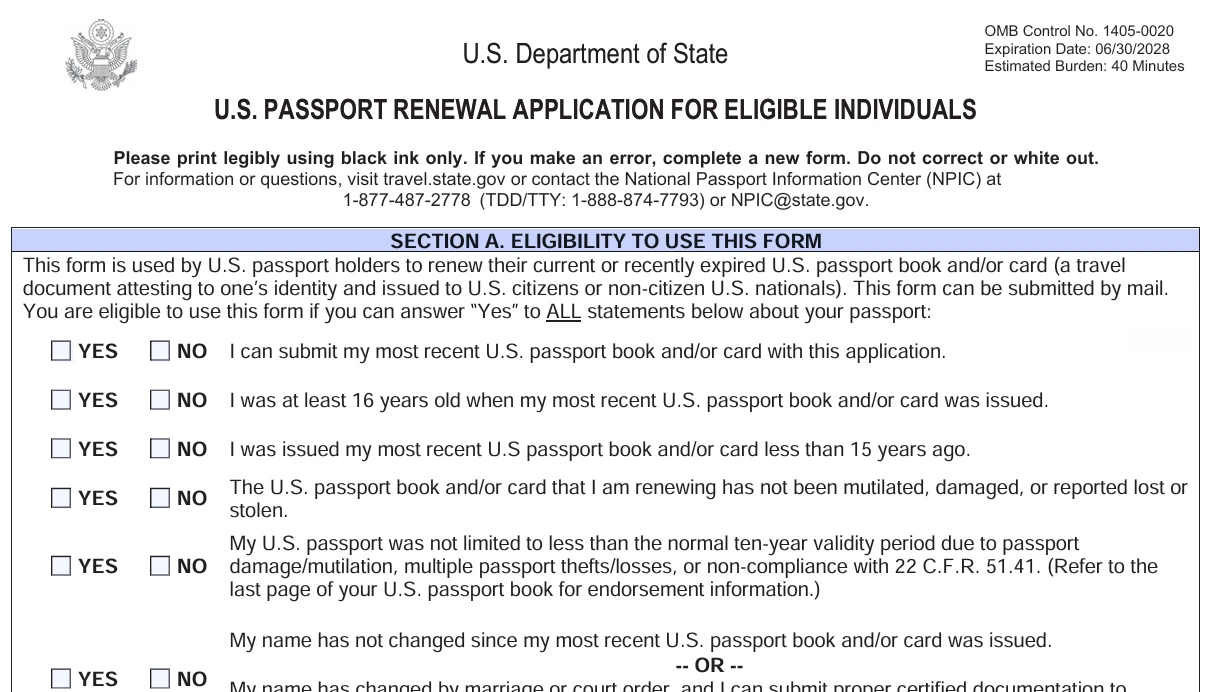
Eligibility for DS-82 comes down to six conditions, and every one of them has to be true. The table below lists each requirement as it appears on the official eligibility check.
| Condition | What It Means |
|---|---|
| Most recent passport available | You can submit your most recent U.S. passport book and/or card with this application |
| Issued at 16 or older | You were at least 16 years old when that passport was issued |
| Issued within 15 years | That passport was issued less than 15 years ago |
| Undamaged and in your possession | The passport has not been mutilated, damaged, or reported lost or stolen |
| Full validity period | The passport's validity was not limited to less than the normal ten-year period due to damage or a compliance issue |
| Name unchanged or documented | Your name has not changed, or if it has, you can submit certified proof such as a marriage certificate or court order |
If even one of these does not apply to you, the mail-in option is off the table and Form DS-11 becomes the one to use instead. A passport that was issued when you were under 16, for example, cannot be renewed with DS-82 regardless of how recently it was issued, since the photo and physical description on file no longer reflect an adult applicant.
The lost or stolen condition is worth a closer look, since it covers more than a passport currently missing. If your previous passport was ever reported lost or stolen and later turned up, it still cannot be used to renew through DS-82, because a passport that has been reported lost or stolen gets invalidated in the government's system the moment it is reported, regardless of whether it physically reappears afterward. Anyone in that situation needs Form DS-11 even if the old passport is sitting in a drawer at home. Finding an old passport after reporting it lost does not reverse that invalidation, so it is worth treating the DS-11 requirement as final rather than trying to argue the case with an acceptance agent.
How to Fill Out DS-82 Online
WukongPDF's DS-82 Form tool walks through the same fields the printed version includes, from your current information through the details of your most recent passport book or card. Because DS-82 asks for both your present details and a record of what is printed in your existing passport, having the two side by side while filling out the form on a screen makes it easier to catch a transposed number or a misspelled name before it becomes a mismatch on the application.
The tool also covers the name change section for anyone whose eligibility depends on providing proof of a legal name change. That part of the form asks for the date and location of the change along with a checkbox for whether it happened through marriage or a court order, and getting that section right the first time avoids a follow-up request from the processing center. Filling out a Passport Renewal this way keeps every box aligned exactly as it would appear on a paper copy, without the guesswork of fitting handwriting into a narrow field.
Two contact phone number entries appear on the form's second page, each with its own type selector for home, work, or cell. It is easy to overlook filling in the second one since it is optional, but leaving both blank removes a backup way for the passport office to reach you if something on the application needs clarification. Entering at least one working number, even if the second field stays empty, is worth doing even though nothing on the form requires it.
Signing, Printing, and Mailing Your Application
Even though DS-82 skips the in-person appointment, the signature requirement does not disappear. The form has to be signed by hand in black ink, and that signature needs to match the one on file from your current passport. A typed or digital signature is not accepted under any circumstances, since the whole renewal process relies on that handwritten match as proof of identity.
Print the form on two separate sheets rather than double-sided, since double-sided printing is explicitly rejected during processing. Attach a 2x2 inch color photo taken within the last six months using four staples, one in each corner, without bending the photo or covering your face. Package the signed form, the photo, your current or expired passport, any name change documentation, and payment together, then mail everything to the address listed in the form instructions, which varies depending on where you live and whether you are requesting routine or expedited service.
Keep a copy of the completed form for your own records before mailing the original. A Fillable PDF makes this step simple since the finished file is already saved once you download it, unlike a paper form where making a duplicate means a trip to a copier. Having that record on hand also makes it easier to double check what you sent if the processing center reaches out with a question weeks later, since the details will still be fresh in the saved file rather than something you have to reconstruct from memory.
Common Reasons DS-82 Applications Get Delayed
A signature that does not visually match the one in your current passport is one of the more frequent holdups, particularly for anyone whose handwriting has changed over the years or who signed their previous passport differently than they normally would today. There is no way to appeal this from a distance once a package is already in processing, so it helps to sign the new form the same way you signed the old one if at all possible.
Missing or incorrect payment causes its own share of delays. DS-82 does not require the execution fee that in-person applications pay, only the passport fee itself, and sending a check made out for the wrong amount or the wrong payee holds up the entire package until it gets corrected. Double-checking the current fee schedule on travel.state.gov before writing a check is worth the extra minute, since fees are adjusted periodically and an outdated number from an old guide will not match what the processing center expects. Two checks are sometimes needed if you are applying for both a book and a card, and combining them into a single payment when the instructions call for separate ones is another version of the same problem.
A name change submitted without certified documentation is another common snag. A photocopy of a marriage certificate is not sufficient. The form requires a certified copy, which usually means requesting one from the county or state office that issued the original if you do not already have a spare on hand. Applicants sometimes discover this requirement only after their package is returned, so requesting a certified copy ahead of time, even before you start filling out the rest of the form, saves a full mailing cycle. The same certified-copy rule applies to a court order changing your name, so a plain copy from your own files will not be accepted any more readily than an uncertified marriage certificate would be.
Address mismatches between the mailing address section and the permanent address section can also slow things down, particularly for applicants who list a P.O. box in one place and a street address in another without realizing the form expects them to be consistent unless the two genuinely differ. Reading through the full form once before mailing it, rather than filling out each section in isolation, tends to catch this kind of inconsistency before it becomes the processing center's problem instead of yours.
Sending the current or expired passport without removing any visa stickers or entry stamps you might want a record of is a smaller but still common oversight. The State Department returns the old passport once the new one is issued, usually with a corner clipped to show it has been canceled, but that return trip adds time to an already multi-week process. Photographing or scanning the pages you care about before mailing the package means you are not stuck waiting for the physical document to come back just to reference a past visa or stamp.