A U.S. passport application starts with one of two government forms, and picking the wrong one is a common reason applications get sent back at the counter. Form DS-11 is the one nearly every first-time applicant needs, along with anyone whose situation does not qualify for the simpler mail-in renewal process. WukongPDF now offers a dedicated tool that lets you complete every field on DS-11 online before you print it, which cuts down the time spent at the passport office and reduces the chance of a rejected application caused by illegible handwriting or a skipped field.
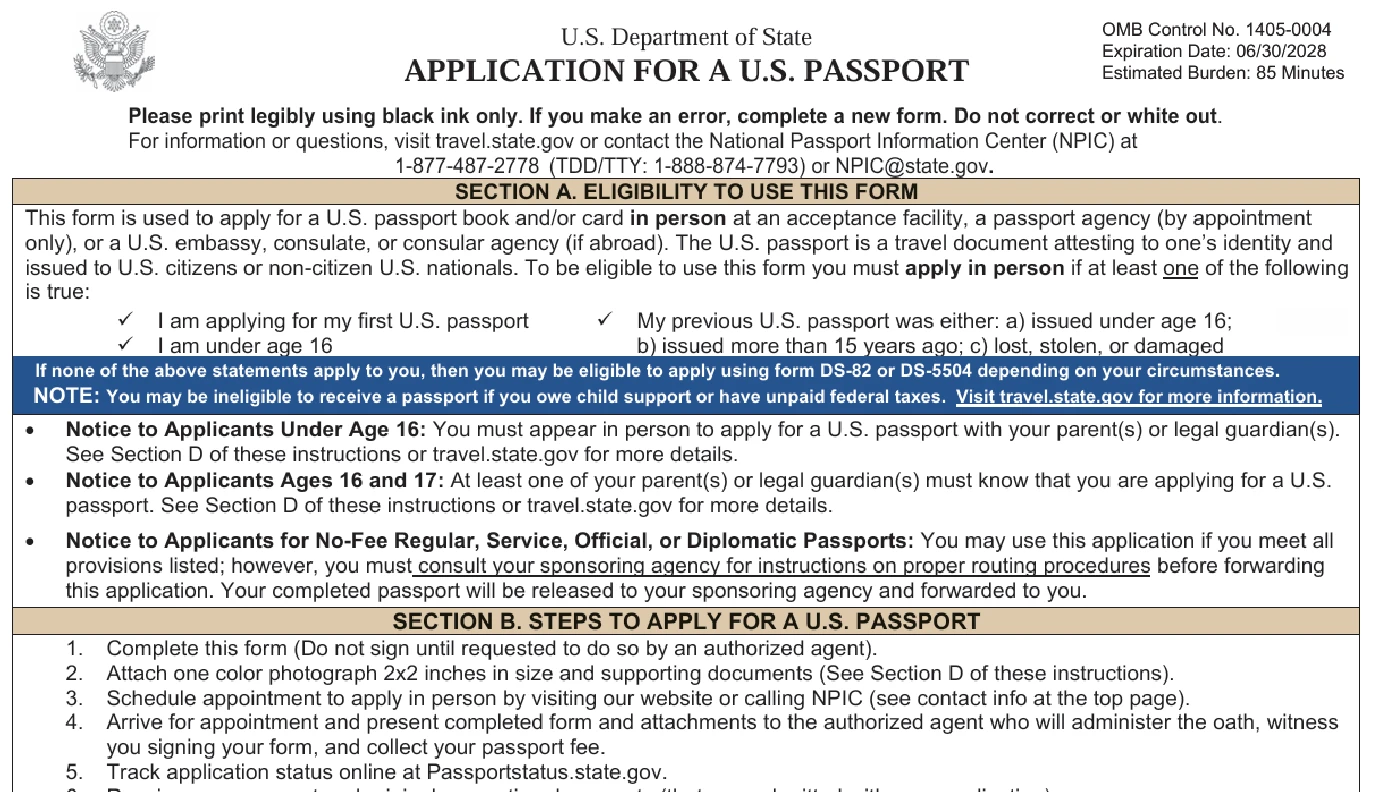
What Is Form DS-11
DS-11 is the application the U.S. Department of State uses for a passport book, a passport card, or both. Unlike a renewal form that simply updates an existing record, DS-11 collects a full identity profile: legal name, date of birth, place of birth, Social Security number, physical description, and mailing address, along with details about any previous passport you may have held.
The form runs two pages once printed, with a separate set of instructions covering eligibility, required documents, and photo standards. Because it establishes identity for the first time or re-establishes it after a loss, DS-11 cannot be mailed in. Every applicant has to appear in person at an acceptance facility, which is typically a passport acceptance post office, a clerk of court, or a passport agency by appointment.
Minors are held to the same form but a different signing process. A parent or legal guardian has to appear alongside the child in most cases, and the form includes space for that guardian's information and signature on a separate line from the applicant's own.
Every version of the form carries an OMB control number and an expiration date printed in the top corner, which is the government's way of tracking which edition is currently valid. Using an outdated copy pulled from an old bookmark or a search result that has not been updated can result in a form the acceptance agent will not accept, so it is worth confirming you are working from the current version before you start filling anything in. The instructions accompanying the form are updated on the same schedule, so a mismatched pair, an old form with new instructions or the reverse, is another thing worth ruling out before an appointment.

Who Actually Needs DS-11
Four situations point to DS-11 specifically. You need it if this is your first U.S. passport, if you were under 16 when your most recent passport was issued, if your previous passport was lost, stolen, or damaged, or if your last passport was issued more than 15 years ago. Any one of these on its own is enough to rule out the mail-in renewal option.
The under-16 condition catches a lot of people off guard. Even if your previous passport was issued fairly recently, if you were a minor at the time, the renewal form is not available to you as an adult applicant. The State Department treats that first adult passport the same way it treats a completely new applicant, since the physical description and photo on file no longer reflect a match.
If none of those four situations apply to you, meaning your last passport was issued when you were 16 or older, within the past 15 years, and it is intact and in your possession, you might qualify for Form DS-82 instead, which can be renewed by mail. It is worth double-checking eligibility before starting either form, since printing and driving to an acceptance facility with the wrong paperwork just adds a second trip.
What You Need Before You Start
Gathering documents ahead of time makes the in-person appointment faster and avoids a rejected submission. Bringing photocopies in addition to originals matters here too, since the acceptance facility keeps the copies and hands your originals back once they have been reviewed. The table below covers what most applicants need to bring, though specific requirements can vary based on age and citizenship history.
| Item | What It Covers |
|---|---|
| Proof of citizenship | An original or certified U.S. birth certificate, a previous U.S. passport, or a naturalization certificate, plus one photocopy |
| Photo identification | A driver's license or another government-issued photo ID, original plus one photocopy |
| Passport photo | A 2x2 inch color photo taken within the last 6 months, plain white or off-white background |
| Payment | Application fee and execution fee, usually paid as two separate checks or money orders |
| Completed but unsigned DS-11 | Printed on standard paper, filled in but not yet signed |
For anyone applying on behalf of a child, add the parent or guardian's own photo ID and, if only one parent is present, documentation showing sole legal custody or the other parent's written consent. These extra steps exist because a passport for a minor can only be issued with both parents' knowledge unless a court order says otherwise.
How to Fill Out DS-11 Online
Typing directly into a browser removes most of the guesswork that comes with hand-printing a two-page government form. WukongPDF's DS-11 Form tool mirrors the official layout field by field, so the name, date of birth, Social Security number, and address boxes line up exactly the way they would if you filled out a paper copy by hand, just without the risk of a smudged entry or a box that is too small for your handwriting.
The tool also handles the split date and number boxes automatically. Instead of counting characters to fit a Social Security number into nine individual squares, you type the number once and it distributes into the correct boxes on its own. The same applies to the date of birth field and the phone number section, both of which are broken into separate boxes on the printed form but behave like a single input while you are typing.
Once every field is complete, you download a filled-in PDF that is ready to print, matching the official Passport Application exactly as the State Department issued it. Nothing about the layout, spacing, or page numbering changes, so the acceptance agent sees a form that looks identical to one filled out by hand, just easier to read.
Printing, Signing, and Submitting Your Form
Filling out DS-11 online only covers part of the process. The form still has to be printed, and the signature line has to stay blank until you are standing in front of the acceptance agent. A form that arrives already signed gets rejected on the spot, because the whole point of DS-11's in-person requirement is that the agent watches you sign it and compares that signature to your identification.
Bring the printed form along with every document from the checklist above, and expect the appointment itself to take somewhere between fifteen and thirty minutes for a straightforward application. The agent reviews your documents, watches you sign, and administers a brief oath confirming that the information on the form is accurate.
Once the agent has witnessed your signature, you pay the applicable fees, hand over your documents, and the acceptance facility forwards everything to the National Passport Processing Center. From there you can track the application status online using the confirmation information provided at your appointment. Processing times shift throughout the year, so checking the current estimate on travel.state.gov before you schedule any travel plans is worth the extra step.
Common Mistakes That Slow Down DS-11 Applications
Signing the form before your appointment is the most frequent reason applications bounce back, since there is no way to undo a signature once it is on the page. A second common issue is a name that does not match across documents, such as a birth certificate listing a different middle name than the one entered on the form. Reviewing every field against your supporting documents before printing catches most of these problems early.
Photo requirements trip up a fair number of applicants too. A photo with shadows, a colored background, or glasses reflecting light will get flagged during processing, so it helps to check the current photo specifications on travel.state.gov before your appointment rather than relying on an older set of guidelines. A Fillable PDF cuts down on data entry errors, but it cannot catch a photo that does not meet the requirements, so that part still needs a manual check.
A less obvious mistake is leaving the Social Security number field blank instead of entering nine zeros when an applicant genuinely does not have one. The form requires an explanation in that case, and skipping it outright can delay processing even though the rest of the application is complete and accurate.
Address formatting causes its own share of holdups. The mailing address section on DS-11 expects a standard street address or a P.O. box, and entries that mix both or that squeeze an apartment number into the wrong line tend to get flagged for clarification. Filling out the form on a screen rather than by hand makes it easier to catch an address that runs longer than the available space before you print anything, since a digital field will visibly overflow rather than trailing off the edge of a printed box. The same applies to long place names in the place of birth field, which can be tighter than expected for anyone born outside a major city.
Working through the form on a phone or tablet is common enough that it is worth mentioning separately. Because the tool runs in a browser rather than a dedicated app, it works the same way on a laptop, a tablet, or a phone, which matters if your only reliable internet access before an appointment is a mobile connection. The layout adjusts to a smaller screen without changing which fields correspond to which boxes on the printed form, so switching devices partway through does not require starting over.