What's New: A Built-In W-9 Form Filler
WukongPDF just added a dedicated tool for filling out Form W-9, the IRS document that freelancers, contractors, and vendors send to whoever pays them. The tool loads the current version of the form directly in the browser, so there is no need to search for a template or worry about downloading an outdated copy from a search result that may or may not be current.
Anyone who has worked as an independent contractor knows the drill. A client asks for a completed W-9 before they can process payment, and the request usually comes with a short deadline. Printing the form, filling it out by hand, and scanning it back in is slow, and it often produces a file that looks a little crooked or hard to read. A Fillable PDF that works directly in the browser removes that entire step, along with the need to own a printer and scanner in the first place.
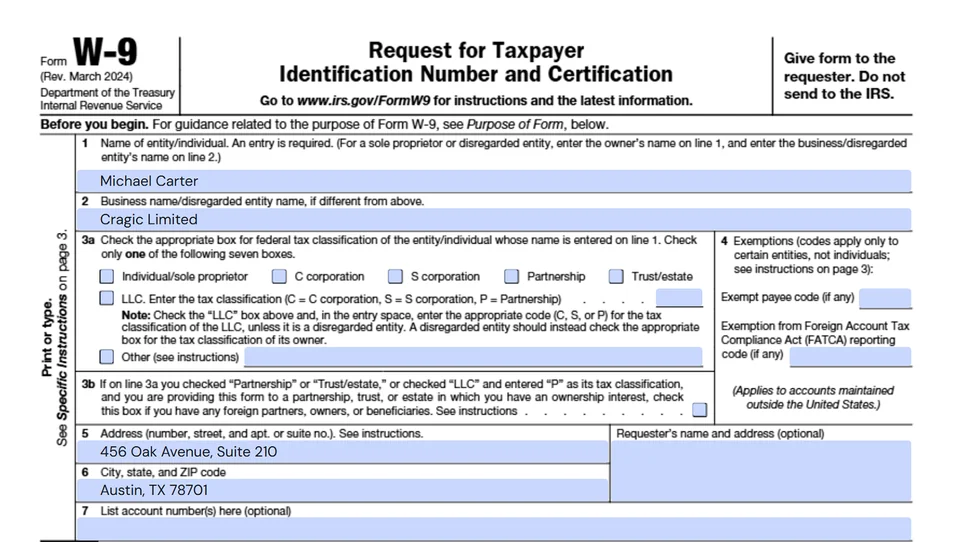
The form itself is not new. Form W-9 has been part of U.S. tax reporting for decades, and the current revision dates to March 2024. What is new is how it gets filled out. Instead of treating it like any other document that happens to have blank lines, the tool recognizes each individual field on the page, including the taxpayer classification checkboxes in section 3a and the separate boxes for a Social Security Number versus an Employer Identification Number.
The new tool sits inside the existing PDF editor framework, so it shares the same thumbnail navigation, zoom controls, and page handling that the rest of the site already uses. Anyone who has used another editing tool on the site before will find the layout familiar, right down to the way pages can be rotated or a blank page inserted if someone needs to print the completed form alongside a cover sheet.
How to Fill Out Your W-9 Online
Opening the tool brings up a blank, official W-9 template with every fillable field already mapped out. Instead of typing into a plain text box and hoping it lands in the right spot, each field on the form (legal name, business name, tax classification, address, and taxpayer identification number) is clickable and sized to match the printed layout. Text lands inside the lines instead of floating above or below them.
The Social Security Number and Employer Identification Number fields auto advance as digits are entered, so there is no need to click between boxes the way a person would when typing a phone number into separate fields. Signing the form works the same way it does elsewhere on the site: click the signature line, draw or type a signature, and place it. A date field opens a small calendar picker instead of asking for a typed date, which keeps the format consistent no matter how the person filling it out normally writes dates.
Mistakes happen, so there is an undo button for stepping back through recent changes and a clear all option for starting over without closing the tab and reopening the form. Both sit in the toolbar above the document, next to the page thumbnails on the left side of the screen.
Once every field is filled in, clicking Finish brings up a filename confirmation box, then generates the completed PDF for download. The whole process typically takes less time than it takes to find a working printer, which is part of the point. Anyone who wants to try it can open the Forms menu at the top of the site and select W-9.

Old Way vs. New Way
Filling out a W-9 has traditionally meant one of a few options, each with its own tradeoffs. Some people print a blank copy every time they need one. Others keep a scanned copy on file and edit it in whatever software happens to be installed. A smaller group uses a general purpose PDF editor that was built for any document rather than this specific form.
| Method | What You Need | Typical Time | Common Friction Points |
|---|---|---|---|
| Print, sign, scan | Printer, pen, scanner or scanning app | 15 to 30 minutes | Printer jams, crooked scans, blurry uploads |
| Generic PDF editor | A separate PDF editing app or subscription | 10 to 15 minutes | Text boxes that do not line up with form fields |
| WukongPDF's W-9 tool | A browser | Under 5 minutes | None reported so far |
The table above is not meant to suggest that printing a form is difficult. It is meant to show where the friction usually shows up: hardware you may not have handy, or a general purpose editor that was not built with this specific form in mind and requires manually placing text boxes over each line. A tool built around one form can skip that step entirely, since it already knows where line 1 ends and line 2 begins.
There is also a quieter cost to the older methods: version control. A W-9 saved on a laptop from two years ago may not reflect the current IRS revision. A tool that loads the current template each time removes that risk without anyone having to think about it.
None of this means the older methods stop working. A printer and a pen will always produce a valid, signed W-9. The difference shows up in how often the form gets requested. Someone who fills out a handful of these a year may not notice the friction. Someone who fills out several a month, whether as a contractor juggling multiple clients or a business onboarding new vendors, tends to feel it more.
Built for Freelancers, Contractors, and Small Businesses
A W-9 request usually shows up at an inconvenient time. A new client wants to onboard quickly, an existing client needs an updated form after a business name change, or an accountant is chasing down paperwork before a filing deadline. In all of these situations, the person filling out the form is rarely at a desk with a printer and scanner within reach, and more often than not they are on a laptop between other tasks or answering the request from a phone.
Small businesses that collect W-9s from vendors face a related but different problem. They often need several completed forms lined up before they can issue payments or prepare 1099 forms at year end. Chasing down a dozen vendors for paperwork, each of whom may handle the request differently, tends to slow that process down. A tool that lets a vendor complete the form from a phone or laptop, in a few minutes, removes a common bottleneck on both sides of that exchange.
Bookkeepers and accountants who prepare year end filings on behalf of clients run into the same issue from another angle. They frequently need a W-9 on file for anyone the client paid more than $600 during the year, and tracking that paperwork down after the fact is one of the more tedious parts of the job. Being able to point a client or vendor to a form that takes a few minutes to complete, rather than mailing a blank template and waiting for a scanned copy to come back, shortens that whole cycle.
The form itself has not changed. What changed is how much friction sits between deciding to fill it out and actually having a completed, signed copy ready to send.
There is a broader pattern here beyond any single form. As more freelance and contract work moves entirely online, the paperwork that supports it has been slower to catch up. A payment can clear in seconds, but the tax documentation behind it has often still relied on a printer sitting somewhere in a home office. Closing that gap for one specific, widely used form is a small step, but it addresses a piece of the process that almost everyone doing contract work in the U.S. runs into sooner or later.
Available in 13 Languages
The W-9 tool, including field labels, instructions, and the frequently asked questions section, is available in 13 languages: English, Simplified and Traditional Chinese, Spanish, Portuguese, French, German, Italian, Dutch, Polish, Russian, Japanese, and Korean. This matters more than it might seem at first, since a growing share of independent contractors and vendors working with U.S. companies are based outside the country or are simply more comfortable working in a language other than English.
The underlying PDF Forms and the certification language on the form itself remain in English, since that is the official IRS text and changing it would affect the legal accuracy of the document. What gets translated instead is everything around it: the step by step guidance, the field level hints that explain what belongs on each line, and the answers to common questions like when a W-9 is required and where a completed one should be sent.
That distinction matters for a document with legal weight. The goal is not to translate a government form and risk changing its meaning. It is to make sure someone filling out an unfamiliar form for the first time understands what each section is asking for, in a language they are comfortable reading, before they sign it.
Getting Started
The W-9 tool is live now under the Forms menu in the main navigation. It works the same way whether someone needs to fill out a single form for a new client or a business is asking multiple vendors to submit one, and it does not require creating a project or naming a file before starting.
The page opens directly to a preview of the blank form, with a single button to start filling it in. From there, the process runs through the same fields described above: name, business name if applicable, tax classification, address, taxpayer identification number, and a signature.
Anyone who has dealt with the print, sign, and scan routine before will likely notice the difference on the first try. A W-9 Form that used to take a spare printer and twenty minutes now takes a few clicks and a browser tab, and the completed copy downloads ready to send.